Managing the security of a growing digital infrastructure can feel like a game of whack-a-mole. You secure your main website, but then a new marketing landing page pops up. Next, the development team needs a staging environment, and the sales team requests a dedicated portal. Suddenly, you are juggling a dozen different SSL certificates, each with its own expiration date and renewal process.
Enter wildcard certificates: the Swiss Army knife of SSL/TLS security.
This guide goes beyond the basics. We will explore exactly how wildcard certificates function at a technical level, why they are a critical asset for scalable architecture, and the specific security considerations you need to be aware of—particularly regarding private key management. Whether you are a system administrator looking for an installation walkthrough or an IT manager weighing the cost benefits, this article covers everything you need to know to deploy wildcard certificates effectively.
What Are Wildcard Certificates?
At its core, an SSL/TLS certificate is a digital file that binds a cryptographic key to an organization’s details. Standard certificates are usually single-domain, meaning they secure one specific Fully Qualified Domain Name (FQDN), such as www.example.com.
Wildcard certificates differ because they use a wildcard character (*) in the Common Name field of the certificate subject. This single character acts as a variable, allowing the certificate to secure the base domain and an unlimited number of first-level subdomains.
For instance, a certificate issued to *.example.com will validly secure:
- mail.example.com
- dev.example.com
- payment.example.com
- example.com (often included as a Subject Alternative Name)
However, it is crucial to understand the limitations of the wildcard hierarchy. A standard wildcard certificate for *.example.com will not secure second-level subdomains like login.dev.example.com. To secure that, you would need a separate wildcard certificate for *.dev.example.com.
Validation Types: DV vs. OV
When purchasing wildcard certificates, you generally have two main validation options. Understanding the difference is key to choosing the right level of trust for your organization.
Domain Validation (DV)
DV wildcard certificates are the most common and easiest to obtain. The Certificate Authority (CA) simply verifies that you own the domain name. This is usually done via email verification, DNS record modification, or file upload.
- Best for: Internal sites, test environments, blogs, and small businesses where establishing legal identity is less critical than encryption.
- Speed: Issued in minutes.
Organization Validation (OV)
OV wildcard certificates require a more rigorous vetting process. The CA not only checks domain ownership but also verifies your organization’s legal existence and physical address.
- Best for: Public-facing corporate websites, e-commerce platforms, and web apps where user trust is paramount. When users click on the certificate details, they see your company name, not just the domain.
- Speed: Issued in 1-3 days.
Note: Extended Validation (EV) wildcard certificates do not exist. The strict security standards of EV require the specific auditing of every single FQDN, which contradicts the “unlimited” nature of a wildcard.
Wildcard Certificates vs. SAN Certificates
A common point of confusion arises between wildcard certificates and Multi-Domain (SAN) certificates. While both secure multiple endpoints, they do so differently.
| Feature | Wildcard Certificates | SAN (Multi-Domain) Certificates |
| Scope | One main domain + unlimited subdomains. | Multiple distinct domains (e.g., example.com, mysite.net). |
| Flexibility | High. You can add new subdomains anytime without reissuing. | Low. You must list every domain specifically. Adding a new one requires reissuing. |
| Cost | Fixed price regardless of subdomain count. | Often priced per domain or in blocks of domains. |
| Ideal Use | Dynamic environments where subdomains change frequently. | Static environments with different brand names or extensions. |
The Economics of Wildcard Security
From a budgeting perspective, wildcard certificates are a powerhouse. Let’s break down the cost-benefit analysis.
If a standard single-domain OV certificate costs $100 per year, and you have 15 subdomains to secure, your annual spend is $1,500. A comparable OV wildcard certificate might cost $400 per year. By switching, you save $1,100 annually—a 73% reduction in cost.
Beyond the direct price tag, there are hidden savings in labor. Managing the lifecycle of 15 separate certificates involves 15 CSR generations, 15 validation steps, 15 installations, and 15 renewal dates. With a wildcard certificate, you do this once. This reduction in administrative overhead allows your IT team to focus on proactive security measures rather than paperwork.
Security Implications: The Private Key Dilemma
While wildcard certificates offer immense convenience, they introduce a unique security risk: private key proliferation.
When you use a wildcard certificate across multiple servers (e.g., your mail server, web server, and FTP server), you must copy the private key to each of those locations. If one of those servers is compromised, the attacker potentially gains the private key for all your subdomains.
Best Practices for Mitigation
- Limit Scope: Don’t use the same wildcard certificate for high-security production environments and low-security development environments. If a dev server is hacked, your production traffic could be decrypted.
- Use Load Balancers: Terminate SSL at the load balancer or reverse proxy level. This way, the private key resides in one secure location rather than being scattered across dozens of backend servers.
- Monitor Transparency Logs: Keep an eye on Certificate Transparency (CT) logs to ensure no unauthorized certificates are issued for your domain.
Installation Overview: Apache and Nginx
Installing a wildcard certificate follows the same general principles as a standard certificate, but you must ensure the configuration applies to all relevant virtual hosts.
Apache Installation
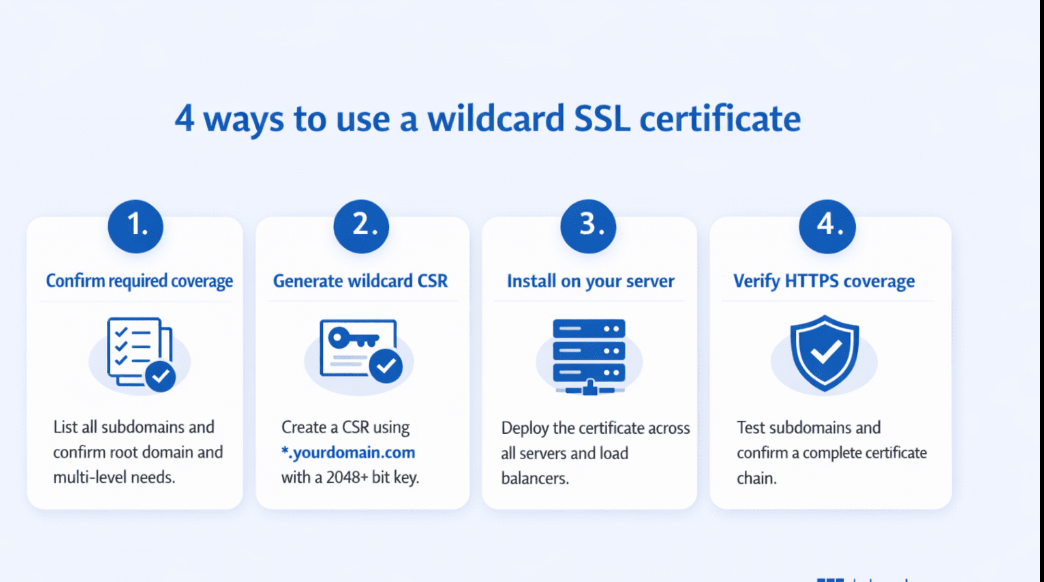
- Prepare Files: Ensure you have your certificate file (your_domain.crt), private key (private.key), and the CA bundle (ca_bundle.crt) on the server.
- Edit Configuration: Open your SSL configuration file (often in /etc/httpd/conf.d/ or /etc/apache2/sites-available/).
- Configure Virtual Host:
<VirtualHost *:443>
ServerName www.example.com
ServerAlias *.example.com
DocumentRoot /var/www/html
SSLEngine on
SSLCertificateFile /path/to/your_domain.crt
SSLCertificateKeyFile /path/to/private.key
SSLCertificateChainFile /path/to/ca_bundle.crt
</VirtualHost>
- Restart Apache: Run sudo service apache2 restart or sudo systemctl restart httpd.
Nginx Installation
- Concatenate Certificate: Nginx requires the primary certificate and CA bundle in a single file.
cat your_domain.crt ca_bundle.crt > wildcard_bundle.crt - Edit Configuration: Open your server block file (usually in /etc/nginx/sites-available/).
- Configure Server Block:
server {
listen 443 ssl;
server_name *.example.com;
ssl_certificate /path/to/wildcard_bundle.crt;
ssl_certificate_key /path/to/private.key;
# … other settings …
}Restart Nginx: Run sudo nginx -t to test the config, then sudo systemctl restart nginx.
About the Author